AI
Automatically generate anatomical segments using AI models.
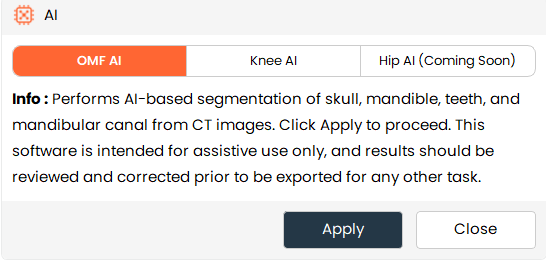
- The AI tool allows users to automatically segment anatomical structures from CT images using deep learning models based on nnU-Net v2.
- It supports multiple AI models to identify specific anatomical regions and create segments automatically.
Steps:
- Choose the AI tool from the Segment Editor effects panel.
- Select the desired AI model (OMF AI or Knee AI).
- Review the information about the selected model.
- Click Apply to start AI-based segmentation.
- Wait for the process to complete. The generated segments will be added automatically.
Additional Information
Model Selection
- OMF AI performs segmentation of skull, mandible, teeth, and mandibular canal from CT images.
- Knee AI performs segmentation of knee structures including femur, tibia, and fibula from CT images.
- Hip AI is currently disabled and will be available in a future release.
First-Time Setup
-
During the first use of AI segmentation, the system may download required AI components or models.
-
Possible downloads include:
- AI components (~2GB)
- AI model (~230MB)
A confirmation dialog will appear before the download starts.
Progress and Processing
- A single progress dialog is shown during the entire workflow.
- The progress includes component installation, model download, and AI inference.
- Users can cancel the process while it is running.